'/%3E%3C/svg%3E)


'/%3E%3Cpath%20fill='%23b2b2b2'%20d='M241%20382q0%2016%2017%2026%2017%2011%2042%2011t42-11q16-11%2017-26V269H241'/%3E%3Cpath%20fill='%239f7e00'%20d='M241%20379q0%2014%208%2023%209%209%2021%209%2014%200%2021-9%209-9%209-23V269h-59'/%3E%3Cpath%20d='M241%20339v-70h59v110q0%2014-9%2023l-6%205v-68h-15v72q-8%200-14-4v-68zm59%2040c0%2022%2015%2032%2029%2032%2021%200%2030-18%2030-32v-40h-59'/%3E%3Cpath%20fill='%239f7e00'%20d='M266%20277v5h2v12h-3v-5h2v-5h-9v5h2v5h-4v9h3v18h-5v10h34v-10h-5v-18h3v-9h-4v-5h2v-5h-9v5h2v5h-3v-12h2v-5zm42%20101q0%2010%206%2017%206%206%2015%207%2010-1%2016-7%206-7%206-17v-29h-43'/%3E%3Ccircle%20fill='%230044ad'%20cx='329.5'%20cy='372'%20r='6'/%3E%3Cellipse%20fill='%230044ad'%20cx='300'%20cy='340'%20rx='16'%20ry='21'/%3E%3C/svg%3E)
'/%3E%3C/g%3E%3Cuse%20href='%23c'%20transform='matrix(-1%200%200%201%20720%200)'/%3E%3C/svg%3E)


Xerox® DocuShare® Go
in Solutions
Téléphone : 0224292120
Fax : 919293929199
Adresse : 54 rue de la belle feuille
Code postal : 92100
Ville : Boulogne-Billancourt
Phone : 0224292120
Adress : 54 rue de la belle feuille
Postal code: 92100
City: Boulogne-Billancourt
Telefon: 0224292120
Fax: 919293929199
Adresse: 54 rue de la belle feuille
Postleitzahl: 92100
Stadt: Boulogne-Billancourt
Telefono: 0224292120
Indirizzo: 54 rue de la belle feuille
Codice postale: 92100
Città: Boulogne-Billancourt
Paese: France
Teléfono : 0224292120
Dirección : 54 rue de la belle feuille
País : France
Telefone: 0224292120
Endereço: 54 rue de la belle feuille
Código Postal: 92100
Cidade: Boulogne-Billancourt
Adresse: 54 rue de la belle feuille
Telefoon : 0224292120 -
Fax: 919293929199
Fax: 919293929199
Phone : 0224292120
Adress : 54 rue de la belle feuille
Postal code: 92100
City: Boulogne-Billancourt
Phone : 0224292120
Adress : 54 rue de la belle feuille
Postal code: 92100
City: Boulogne-Billancourt
Phone : 0224292120
Adress : 54 rue de la belle feuille
Postal code: 92100
City: Boulogne-Billancourt
Phone : 0224292120
Adress : 54 rue de la belle feuille
Postal code: 92100
City: Boulogne-Billancourt
Phone : 0224292120
Adress : 54 rue de la belle feuille
Postal code: 92100
City: Boulogne-Billancourt
Phone : 0224292120
Adress : 54 rue de la belle feuille
Postal code: 92100
City: Boulogne-Billancourt
Phone : 0224292120
Adress : 54 rue de la belle feuille
Postal code: 92100
City: Boulogne-Billancourt
AI‑Powered Document Management for modern teams
Designed to meet the demands of today’s business world, the Xerox® DocuShare® Go platform makes it easy to capture, manage, and automate critical document workflows — so you can focus on what matters most: growing your business.
Built-in Intelligent Capture

AI-Powered Advanced Extraction
Manage / AI Summarisation / Natural Language Search
Automate Essential Workflows
Access / Share / Collaborate
Secure Storage / Archival
Why choose Xerox® DocuShare® Go?
- Automate document capture and classification effortlessly.
- Extract and summarize key data to make faster, smarter decisions.
- Streamline workflows and eliminate repetitive tasks.
- Smart filing: AI-based classification of documents, no manual effort required.
- Collaborate and share securely across teams and locations.
- Find content instantly using natural language — no technical expertise needed.
- 100% cloud: access content from any device, no servers or maintenance needed.
Powerful tools to simplify your document management

- Built-in intelligent capture & advanced extraction: scan, upload, or drag and drop your documents from any source — via a scanner, the DocuShare® Go ConnectKey® app, email, or a mobile device. All content is automatically centralized in a secure library.
- Document summarization: automatically extracts and highlights key points from your documents so users can quickly grasp the main ideas.
- AI-powered semantic search: instantly find the information you need. Simply ask a question to access all related content — far beyond basic keyword searches. Say goodbye to digging through endless emails.
- Workflow automation: easily create essential workflows such as invoice validation, approval requests, or contract tracking. Once set up, steps are triggered automatically to keep documents moving.
How does it work?
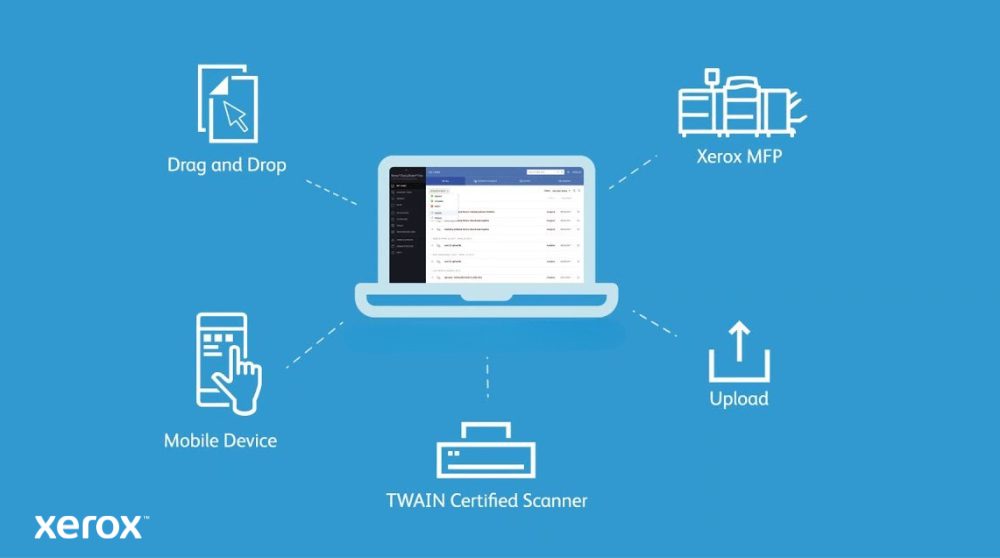
- Log in from any device: access the platform through your web browser — from a computer, smartphone, or directly from a Xerox® ConnectKey®-enabled multifunction device.
- Capture and import your documents: drag and drop digital files or scan your paper documents.
- Let the AI do the work: artificial intelligence analyzes and automatically classifies your documents with tags, indexing, and even handwriting recognition.
- Collaborate efficiently: comment, join discussions, assign tasks, and track progress in real time.
- Share and access your documents securely: from any device, anytime.
For whom? Which use cases?

DocuShare® Go is designed for agile teams that need to manage content efficiently — without infrastructure, without a dedicated IT team, and with simple, collaborative processes.
- Admin managers: centralize invoices, contracts, and quotes with a single click — always accessible.
- Project leads: share, comment, and track progress with built-in version control.
- Small businesses / team leads: access documents anytime, anywhere — no VPN or setup required.
- HR teams: manage employee files and approvals in a secure, intuitive space.
- AP teams: streamline invoice review and approval with AI-powered automation.
Compatibility & Integration
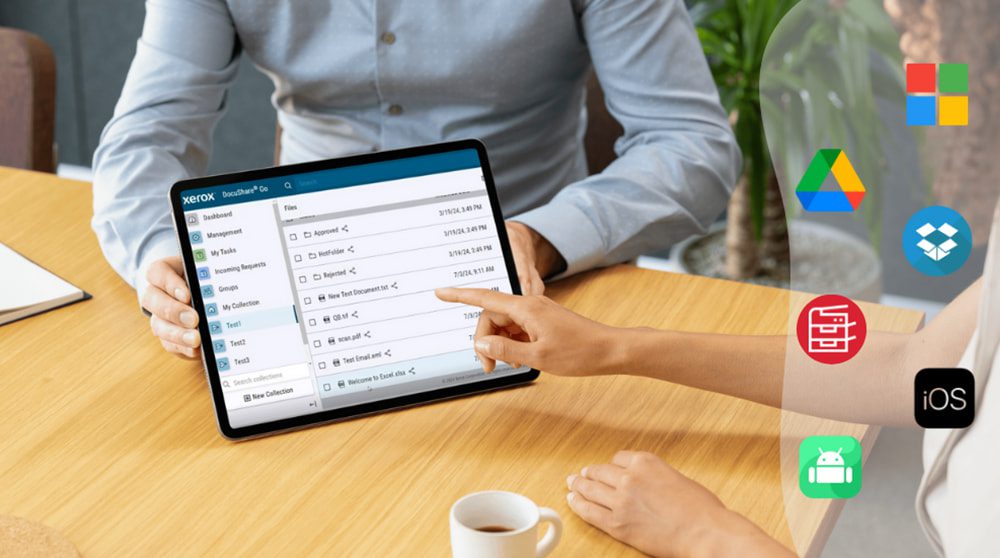
Compatible with leading business environments:
- Microsoft 365 / OneDrive
- Google Workspace / Drive
- Dropbox
- Xerox AltaLink®, VersaLink®, PrimeLink® printers
- IOS / Android smartphones