'/%3E%3Cpath%20fill='%23b2b2b2'%20d='M241%20382q0%2016%2017%2026%2017%2011%2042%2011t42-11q16-11%2017-26V269H241'/%3E%3Cpath%20fill='%239f7e00'%20d='M241%20379q0%2014%208%2023%209%209%2021%209%2014%200%2021-9%209-9%209-23V269h-59'/%3E%3Cpath%20d='M241%20339v-70h59v110q0%2014-9%2023l-6%205v-68h-15v72q-8%200-14-4v-68zm59%2040c0%2022%2015%2032%2029%2032%2021%200%2030-18%2030-32v-40h-59'/%3E%3Cpath%20fill='%239f7e00'%20d='M266%20277v5h2v12h-3v-5h2v-5h-9v5h2v5h-4v9h3v18h-5v10h34v-10h-5v-18h3v-9h-4v-5h2v-5h-9v5h2v5h-3v-12h2v-5zm42%20101q0%2010%206%2017%206%206%2015%207%2010-1%2016-7%206-7%206-17v-29h-43'/%3E%3Ccircle%20fill='%230044ad'%20cx='329.5'%20cy='372'%20r='6'/%3E%3Cellipse%20fill='%230044ad'%20cx='300'%20cy='340'%20rx='16'%20ry='21'/%3E%3C/svg%3E)
'/%3E%3C/g%3E%3Cuse%20href='%23c'%20transform='matrix(-1%200%200%201%20720%200)'/%3E%3C/svg%3E)



Xerox® Print and Scan Experience
in SolutionsFax: 919293929199

Simplify your document workflows with Xerox® Print and Scan Experience
Printing and scanning reimagined for hybrid environments.
Printing or scanning should never be complicated. With Xerox® Print and Scan Experience, you can access all the advanced features of your Xerox® printer from a single application — with no complex setup required.
Designed for hybrid working environments, the app provides a smooth, consistent and intuitive experience across Windows 10/11 and macOS.
Automatic printer detection, simplified installation, OCR, preview, editing tools, shortcuts — everything is built to help you work efficiently, wherever you are.

Why choose Xerox® Print and Scan Experience?
- Simplified setup: automatic printer detection and one-click driver installation.
- Guaranteed compatibility: includes the Print Support App (PSA) for support of those using IPP with Windows Protected Print Mode or Universal Print drivers.
- Perfect for hybrid work: seamless productivity, regardless of location or workstation.
- Workflow Central access: connect via XPSE to simplify workflows and easily convert files into actionable formats.
Key features
- Preview and built-in editing: crop, straighten, remove blank pages, adjust brightness and contrast.
- Integrated OCR: scan documents and convert them into searchable PDF or audio files.
- Workflow automation: create custom shortcuts and combine multiple settings into a single command.
- Signatures and annotations: sign, date and comment on your documents directly within the app.
- Secure PDFs: protect your scanned files with a password.
- Printer monitoring and supply ordering: access maintenance information and support services in just a few clicks.
- Eco-friendly printing: customise settings to reduce environmental impact while printing.
How does it work?
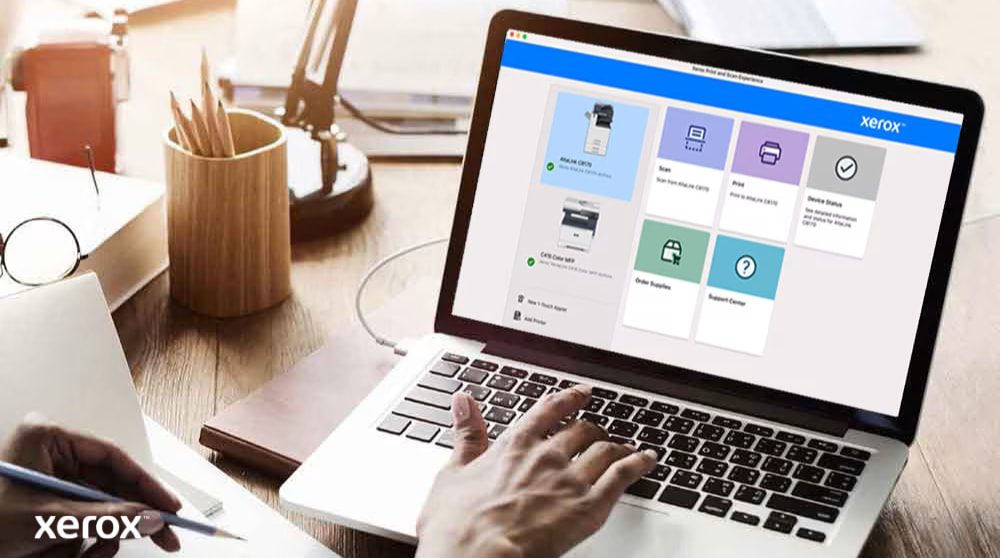
- Download the app from the Microsoft Store or Apple App Store.
- Let it automatically detect your Xerox® printer.
- Install the appropriate print and scan drivers.
- Use the interface to preview, edit, print or scan.
- Add shortcuts, optimise your workflows, and automate your tasks.
Productivity & user experience

A consistent experience for all your users
With Xerox® Print and Scan Experience, you provide your entire team — whether at headquarters, working remotely or on the move — with the same level of simplicity, performance and reliability.
The unified interface, native compatibility with Windows/Mac standards, and automation of document tasks help you:
- Reduce support requests.
- Save time on repetitive tasks.
- Ensure immediate adoption — no training required.